iLoader
iLoader IPA Installer: The Easy Way to Install SideStore and IPAs
If you’ve ever tried installing SideStore or LiveContainer, you already know how frustrating it can be. Pairing files, certificates, Apple ID errors, signing issues, and switching between tools just to install one app—it works, but it’s not user-friendly.
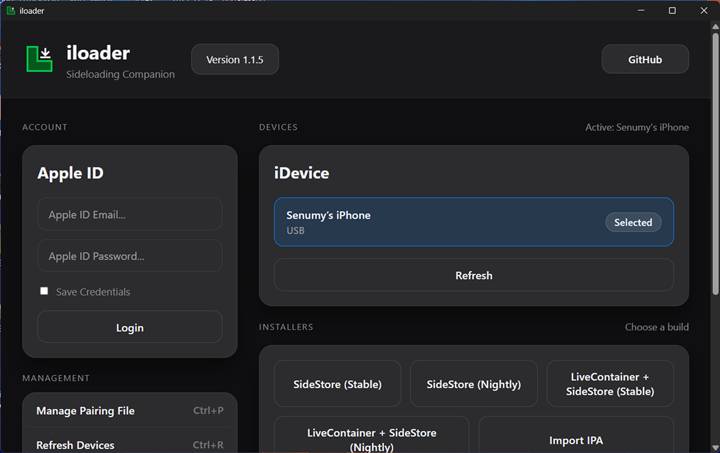
That’s exactly where iLoader helps.
iLoader is a desktop IPA installer designed to handle all the complicated setup steps for you. Its main goal is to install SideStore with LiveContainer, in a clean and reliable way. On top of that, it also works as a general IPA installer, allowing you to install almost any IPA — including apps from Senumy’s IPA Store — without having to redo the setup each time.
What Is iLoader IPA Installer?
iLoader focuses on one simple idea: make iOS app installation easier from a computer.
Instead of manually creating pairing files, importing certificates, and fixing errors, iLoader does everything in the background. You just sign in and install.
Its most popular use is installing SideStore. With iLoader, you can:
- Install SideStore alone, or
- Install SideStore + LiveContainer in one smooth process
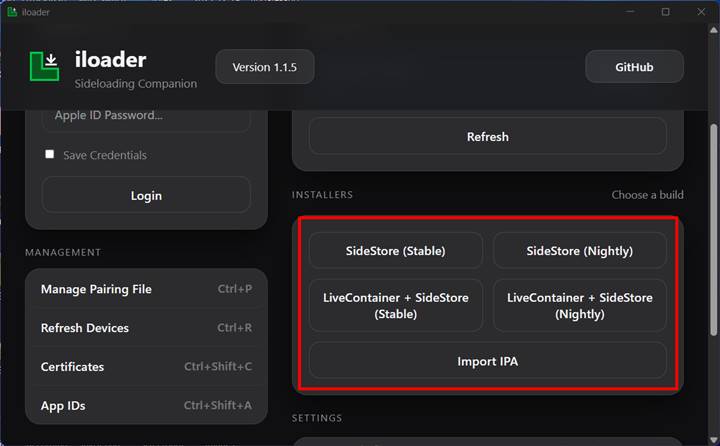
iLoader automatically places pairing files and imports certificates, so you don’t need extra tools or manual steps.
Beyond SideStore, iLoader also works as a full IPA installer. You can install test builds, custom IPAs, or apps from trusted sources like Senumy—making it useful even after your initial setup is complete.
Download iLoader IPA Installer
iLoader is a cross-platform IPA installer that makes installing iOS apps quick and hassle-free. With just one sign-in, you can set up SideStore, install LiveContainer, or sideload any IPA from Senumy’s IPA Library—no manual pairing files or complicated steps required.
It works smoothly on Windows, macOS, and Linux, making iOS app installation simple for everyone.
v 2.2.3
Download the iLoader tool for Linux and other operating systems from the official releases page:
Want the latest updates, new releases, and support? Join our Telegram channel and stay connected!
👉 Join us on Telegram
Installing SideStore and LiveContainer Safely
For most users, SideStore is the first app they install with iLoader—and this is where the tool really shines. The process is guided, consistent, and much harder to mess up compared to manual methods.
⚠️ Important note about LiveContainer:
There is currently a known limitation. If LiveContainer is installed directly using iLoader, multiple LiveContainer installs may share keychain data (such as Google account logins).
✅ Recommended solution:
- Install SideStore first using iLoader
- Then install LiveContainer from inside SideStore
This avoids the issue completely. The developer has confirmed this will be fixed in a future update.
Aside from this limitation, iLoader handles certificates and pairing files cleanly and reliably.
Cross-Platform Support and Useful Features
One of iLoader’s biggest advantages is cross-platform support:
- macOS: Works out of the box
- Windows: Requires iTunes for drivers
- Linux: Uses usbmuxd (usually preinstalled or easy to install)
Other helpful features include:
- Save and switch between multiple Apple IDs
- View and revoke development certificates
- Manage App IDs and pairing files
- Built-in support for tools like SideStore, StikDebug, and Protokolle
Everything stays in one place—no scripts, no scattered folders.
Why Use iLoader?
iLoader isn’t meant to replace SideStore or LiveContainer. Instead, it removes the friction of getting started. If you frequently install IPAs, use SideStore, or help others set up iOS sideloading tools, iLoader fits perfectly into your workflow.
For anyone looking for a clean, simple, cross-platform IPA installer that actually saves time, iLoader is an easy recommendation.
iLoader Alternatives – Best IPA Installers for iOS
If you’re looking for alternatives to iLoader, these trusted tools make it easy to install IPA files on your iPhone or iPad, with or without a computer.
AltStore is a popular and reliable IPA installer for iPhone and iPad. It works on both macOS and Windows. After installing AltStore on your computer, simply connect your device and start sideloading apps in just a few steps.
PlumeImpactor is a modern, open-source IPA installer that works on macOS, Windows, and Linux. It’s a great choice if you want a clean interface and flexible, cross-platform sideloading.
Sideloadly is an easy-to-use but powerful tool for installing IPA apps, tweaks, and games. It supports both Windows and macOS, making it ideal for beginners and advanced users alike.
TrollStore is a special IPA installer for iOS 14.0 to iOS 17.0. It installs apps permanently using CoreTrust, so your apps never get revoked—perfect for long-term sideloading and customization.