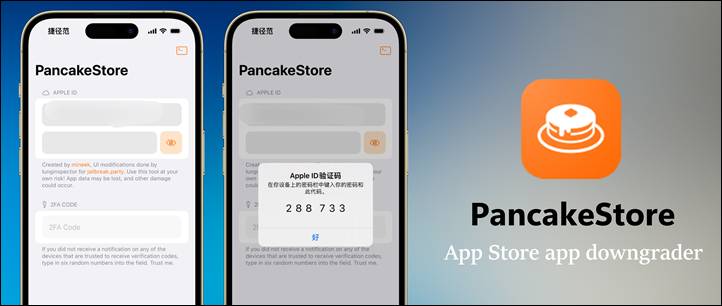
PancakeStore
PancakeStore is a new on-device App Store app downgrader developed by lunginspector for iPhone devices running iOS 16.4 and newer. It allows users to install older versions of App Store apps without jailbreaking their device.
The project is a fork of MuffinStore Jailed, originally created by mineek. While the downgrade method remains the same, PancakeStore focuses on providing a cleaner and more user-friendly interface, making the process easier to understand—especially for first-time users.
What Does PancakeStore Do?
PancakeStore has one main purpose:
👉 Downgrade App Store apps using official Apple servers
Users simply paste an App Store link, and PancakeStore handles the rest. This is especially useful when:
- App updates introduce bugs
- Features are removed
- Performance gets worse
- An older app version works better on your device
Apple does not officially allow users to install older app versions, which is why tools like PancakeStore exist.
Important Warnings
PancakeStore is experimental software. The developer clearly warns users about possible issues, including:
- App crashes
- Login problems
- Potential data loss
This is not a polished consumer app, but rather a practical workaround for newer iOS versions where jailbreak tools are no longer an option.
👉 Always back up your data before using it.
Download PancakeStore IPA for iPhone & iPad
PancakeStore IPA lets you downgrade App Store apps on iPhone and iPad without a jailbreak. It’s ideal for newer iOS versions when app updates cause bugs or remove features.
You can install older app versions directly from Apple’s servers, as long as the app was previously downloaded with your Apple ID.
Simply sideload the IPA using AltStore, SideStore, TrollStore, or Sideloadly—no jailbreak required.
v 1.1
Want the latest updates, new releases, and support? Join our Telegram channel and stay connected!
👉 Join us on Telegram
How to Install PancakeStore IPA Using Impactor
Installing PancakeStore IPA with Impactor is fast and beginner-friendly. Just follow these simple steps.
Step 1: Open Impactor
- Connect your iPhone or iPad to your computer (USB or Wi-Fi)
- Download and open Impactor
- Go to Settings and sign in with your Apple ID
Step 2: Import the PancakeStore IPA
- Click Import
- Select the PancakeStore IPA file from your computer
Step 3 (Optional): Customize App Details
You can edit the app before installing if you want:
- App name
- Bundle ID
- Version number
- Compatibility settings
(This step is optional and can be skipped.)
Step 4: Install the App
- Click Install
- Sign in again if prompted
- PlumeImpactor will automatically sign and install PancakeStore on your device
Step 5: Trust the App on Your Device
On your iPhone or iPad:
- Go to Settings → General → VPN & Device Management
- Find your Apple ID profile
- Tap Trust
✅ Done! PancakeStore is now ready to use.
How PancakeStore Works (Simplified)
- Uninstall the app you want to downgrade
- If you want to keep data, offload the app instead of deleting it
- Install PancakeStore using your preferred sideloading method
- Sign in with your Apple ID
- Two-factor authentication (2FA) can be buggy on newer iOS versions
- Some users report successful login even with random 6-digit codes if the account was used before
- Paste the App Store link into PancakeStore
- Start the downgrade process
- There is no detailed progress bar
- After waiting, iOS will prompt you to install the app
- The older app version appears on your Home Screen
Common Problems and Causes
- Crash during login → Incorrect 2FA code
- Login stuck → Wrong Apple ID credentials
- Downgrade fails → The app was never downloaded or purchased with that Apple ID
⚠️ PancakeStore cannot bypass Apple’s purchase history checks.
How PancakeStore Compares to Other Tools
- MuffinStore (TrollStore version)
- Better if your device supports TrollStore
- More stable and integrated
- AppStore++
- Best for jailbroken devices
- DowngradeApp
- More guided experience, limited device support
- IPATool (command-line)
- Powerful, but requires a computer and technical knowledge
PancakeStore sits in a specific niche:
✔ Works on newer iOS versions
✔ No jailbreak required
❌ Less stable than jailbreak-based tools
Final Thoughts
PancakeStore fills an important gap for users on modern iOS versions who want to downgrade apps but can’t jailbreak. It’s not perfect, and it comes with risks—but for many users, getting a working older app version is worth it.
As with all tools like this, Apple could break functionality at any time. Use PancakeStore carefully, expect rough edges, and don’t rely on it for critical apps.