Impactor
Impactor is a modern IPA sideloading tool developed by the creator of Feather. It is designed as a faster, cleaner, and more flexible alternative to tools like Sideloadly, AltStore, and the old Cydia Impactor.
One of its biggest advantages is automatic pairing file setup. Impactor can directly sideload SideStore and LiveContainer without manual configuration, making it perfect for beginners and advanced users alike.
The tool works on macOS, Windows, and Linux and signs IPA files using your Apple ID with a free 7-day certificate.
What Is Impactor?
Impactor (formerly PlumeImpactor) is a cross-platform, open-source IPA installer for iPhone and iPad. It signs IPA files using Apple’s official services and installs them directly to your device using the same system used by iTunes and AltServer.
It is written in Rust, making it lightweight, fast, and reliable compared to older sideloading tools.
Why Use Impactor?
Impactor was created to solve common sideloading problems and offer more control.
Main Goals
- Replace outdated tools like Cydia Impactor
- Provide a clean and simple UI
- Give users full control over IPA customization
- Support macOS, Windows, and Linux
- Reduce setup time for SideStore and LiveContainer
Future updates are planned for tweak injection, tvOS support, Flatpak builds, and IPA exporting.
Key Features
🔹 Easy IPA Customization
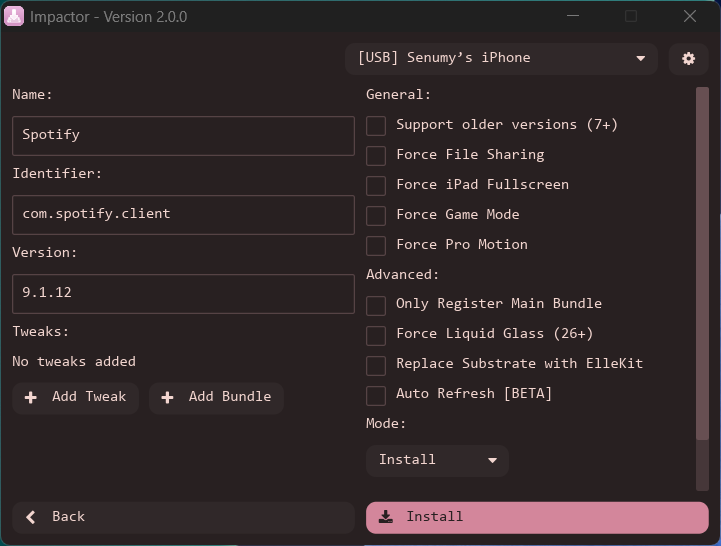
Before installing an app, you can edit:
- App name
- Bundle identifier
- Version number
This helps avoid conflicts and lets you install multiple versions of the same app.
🔹 Compatibility & Behavior Options
Impactor includes smart toggles such as:
- Force iPad fullscreen on iPhone
- Enable Game Mode
- Improve compatibility with older iOS versions
- Force Liquid Glass rendering (supported apps)
These options help apps run better on different devices and iOS versions.
🔹 Advanced Tweak Injection
Impactor goes beyond basic sideloading:
- Supports ElleKit tweak injection
- Embed .deb tweaks, frameworks, bundles, and dylibs
- Prepare modified IPAs without a jailbreak
- Install encrypted IPAs using Normal Install mode
🔹 Powerful Certificate Management
- Automatically generates P12 certificates
- Reusable with SideStore and AltStore
- Auto-creates pairing files for:
- SideStore
- Antrag
- Protokolle
- Supports Ad-Hoc signing for AppSync Unified users
🔹 CLI & Automation Support
- Includes command-line (CLI) builds
- Export modified IPAs after processing
- Automatically removes App Store receipts
- Fixes permission and entitlement issues seen in older tools
Impactor 2.0 – What’s New
Impactor 2.0 is one of the biggest updates ever released.
Major Improvements
- Completely rewritten UI using the iced framework
- More stable, modern, and easier to maintain
- Fresh new design and layout
Experimental Auto Refresh
- Refresh sideloaded apps without reinstalling
- Automatic notifications
- Optional auto-start on system boot
Quality-of-Life Updates
- New tray icon (like Sideloadly)
- Export P12 certificates from settings
- Built-in device utilities
- Team ID picker for multiple Apple IDs
- Replace Cydia Substrate with ElleKit on iOS 26
- Fixed issues with non-ASCII app names
⚠️ Version 2.0 is currently a public beta, so minor bugs may still occur.
Download Impactor
You can download the latest Impactor release for macOS, Windows, and Linux.
v 2.3.0
Want the latest updates, new releases, and support? Join our Telegram channel and stay connected!
👉 Join us on Telegram
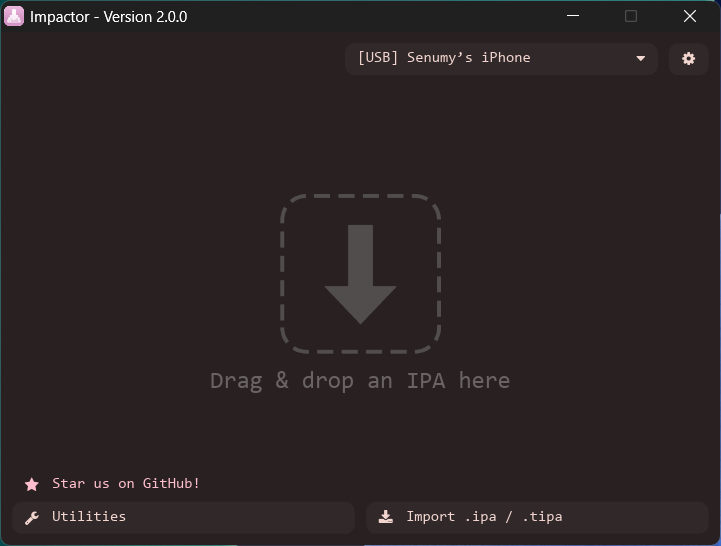
How to Install an IPA with Impactor
Step 1: Open Impactor
- Connect your iPhone or iPad (USB or Wi-Fi)
- Select your device from the dropdown
- Go to Settings and enter your Apple ID
Step 2: Import an IPA
- Click Import
- Choose the IPA you want to install
- You can get IPAs from Senumy IPA Library
Step 3: Adjust App Details (Optional)
You can edit:
- App name
- Bundle ID
- Version
- Enable options like Game Mode or iPad fullscreen
Step 4: Install the App
- Click Install
- Sign in with your Apple ID
- The app will be signed and installed automatically
Step 5: Trust the Certificate
On your iPhone:
- Settings → General → VPN & Device Management
- Trust your developer profile
✅ App is ready to use.