Bypass Apple’s 3-App Limit on iOS 26
Apple still limits sideloading on iOS to just 3 apps per Apple ID, which can be frustrating for users who rely on tweaked or third-party apps. With iOS 26, Apple has increased certificate revocations, making enterprise and shared certificates unreliable.
The good news?
You can bypass Apple’s 3-app limit completely using SideStore + LiveContainer — no jailbreak required.
This method works on iOS 15 and newer, including iOS 26, and lets you run unlimited apps on your iPhone or iPad using a free Apple ID.
Why Apple’s 3-App Limit Exists
When you sideload apps using a free Apple ID, Apple enforces:
- ❌ Maximum 3 installed apps
- ❌ Maximum 10 App IDs (many tweaks use multiple IDs)
- ❌ Frequent app expiration and re-signing issues
On iOS 26, Apple aggressively revokes enterprise certificates, but personal Apple ID signing still works — and that’s where LiveContainer comes in.
How SideStore + LiveContainer Bypass the Limit
LiveContainer is an on-device IPA launcher that works together with SideStore to avoid Apple’s app limits.
Instead of installing apps normally:
- Apps run inside LiveContainer
- Only one signed app counts toward Apple’s limit
- You can run unlimited IPAs without re-installing
Key Benefits
- ✅ No jailbreak required
- ✅ No enterprise certificates
- ✅ No app revokes
- ✅ Works with a free Apple ID
- ✅ On-device re-signing
- ✅ Supports multiple versions of the same app
LiveContainer Features
- 📦 Unlimited app launching
- 🧩 Built-in TweakLoader (CydiaSubstrate support)
- 🏠 Add container apps to Home Screen
- 📱 Multitasking on iPhone & iPad
- 👻 App hiding (3 privacy levels)
- 🔁 Multiple app containers (use multiple accounts)
When JIT (Just-In-Time) or JIT-less mode is enabled, apps can run without traditional code signing.
LiveContainer Features
- 📦 Unlimited app launching
- 🧩 Built-in TweakLoader (CydiaSubstrate support)
- 🏠 Add container apps to Home Screen
- 📱 Multitasking on iPhone & iPad
- 👻 App hiding (3 privacy levels)
- 🔁 Multiple app containers (use multiple accounts)
Supported iOS Versions
- ✅ iOS 15 → iOS 18+
- ✅ iOS 26 fully supported
- ❌ No jailbreak required
- ❌ TrollStore not required
How to Install: Step-by-Step Guide (iOS 26)
Step 1: Install iLoader (PC / Mac / Linux)
iLoader simplifies the entire SideStore + LiveContainer setup.
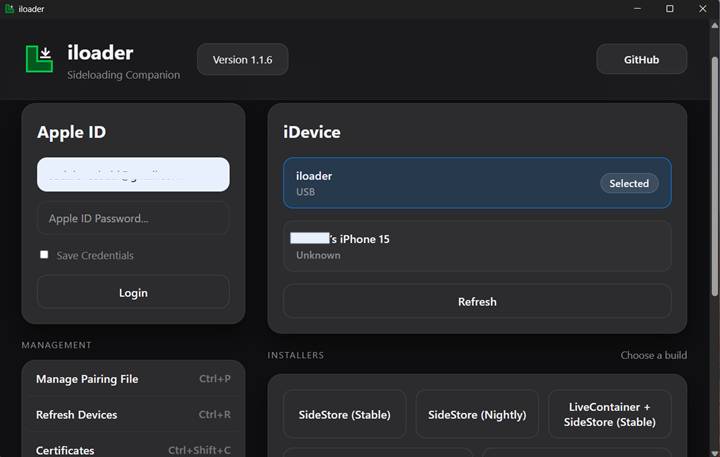
- Download iLoader for Windows, macOS, or Linux
- Launch iLoader on your computer
- Sign in with your Apple ID
- Connect your iPhone via USB
- Select your device from the list
- In Settings, choose SideStore.io as the Anisette Server
Step 2: Install SideStore + LiveContainer
- Select LiveContainer + SideStore (Nightly) in iLoader
- iLoader will:
- Download the apps
- Sign them
- Install pairing files automatically
- Download the apps
- On your iPhone:
- Go to Settings → General → VPN & Device Management
- Trust the developer certificate
- Go to Settings → General → VPN & Device Management
- Install LocalDevVPN from the App Store
- Open LocalDevVPN and tap Connect
Step 3: Configure SideStore
- Open LiveContainer
- Tap the SideStore icon in the top bar
- Go to My Apps → Refresh
- Enter your Apple ID credentials
- Tap Refresh All
- Return to LiveContainer using the top menu
Step 4: Configure LiveContainer
- Open LiveContainer Settings
- Under JIT-Less Mode, tap:
- Refresh Certificate from SideStore
- Refresh Certificate from SideStore
- Tap JIT-Less Mode Diagnose
- Confirm everything shows as working
Step 5: Install Unlimited IPAs
- Tap + in LiveContainer
- Choose:
- Install IPA File, or
- Install from URL
- Install IPA File, or
- The app appears instantly in LiveContainer
- Tap Run to launch — no installation needed
- Long-press apps for advanced options
FAQ – Unlimited Sideloading on iOS 26
❓ What is Apple’s 3-app limit on iOS?
Apple allows only 3 sideloaded apps per device when using a free Apple ID. This limit applies to apps signed with personal developer certificates and has remained in place on iOS 26.
❓ Can you bypass the 3-app limit on iOS 26?
Yes. By using SideStore and LiveContainer together, you can bypass Apple’s 3-app limit and run unlimited IPA apps without jailbreaking your device.
❓ Does this method require a jailbreak?
No. This method works without jailbreak, without TrollStore, and without enterprise certificates. It uses Apple’s standard signing system in a smarter way.
❓ Is LiveContainer safe to use?
Yes, LiveContainer is open-source and widely trusted by the iOS sideloading community. Users should avoid closed-source or modified builds, as they may have access to app data, keychain items, and login credentials.
❓ How does LiveContainer bypass the app limit?
LiveContainer runs multiple IPA apps inside one signed container app, meaning Apple only counts LiveContainer as a single installed app—even if you run many apps inside it.
❓ What is SideStore used for in this setup?
SideStore handles on-device app signing and refreshing using your Apple ID. It works with LiveContainer to keep apps signed without constantly reconnecting to a computer.
❓ Is a computer required?
A computer is required only for the initial setup. After that, apps can be refreshed and managed fully on-device using SideStore and LiveContainer.
❓ Does this work on iOS versions older than iOS 26?
Yes. This method supports iOS 15 and newer, including iOS 16, iOS 17, iOS 18, and iOS 26.
❓ Can I install tweaked apps like YouTube or Spotify?
Yes. You can install modded and tweaked IPA apps, as long as they come from trusted sources and are compatible with LiveContainer.
❓ What is JIT-less mode in LiveContainer?
JIT-less mode allows apps to run without traditional code signing, improving compatibility and removing the need to sign each app individually before use.
❓ Is this method affected by Apple certificate revokes?
No. Since this setup uses a personal Apple ID, it is far more stable than enterprise certificates, which Apple frequently revokes.t way to bypass Apple’s 3-app limit on modern iOS versions.