
iOS 26 Sideloading: Remove the 3-App Limit
Apple restricts sideloading on iOS to just three apps per Apple ID, making it difficult to install multiple tweaked or third-party apps. With iOS 26+, Apple has also increased certificate revocations, causing many enterprise-signed apps to stop working frequently.
Thankfully, there is a reliable solution.
Using SideStore and LiveContainer, you can completely bypass Apple’s 3-app limit and run unlimited IPA apps on your iPhone or iPad — no jailbreak required. This method works with a free Apple ID and is fully compatible with iOS 15 and newer, including iOS 26+.
Instead of installing apps traditionally, LiveContainer runs them inside a secure container, allowing only one signed app to count toward Apple’s limit while giving you access to unlimited apps.
This guide explains how it works, why it’s safe, and how to set it up step by step on iOS 26.
How SideStore + LiveContainer Bypass the Limit
LiveContainer is an on-device IPA launcher that works together with SideStore to avoid Apple’s app limits.
Instead of installing apps normally:
- Apps run inside LiveContainer
- Only one signed app counts toward Apple’s limit
- You can run unlimited IPAs without re-installing
Key Benefits
- ✅ No jailbreak required
- ✅ No enterprise certificates
- ✅ No app revokes
- ✅ Works with a free Apple ID
- ✅ On-device re-signing
- ✅ Supports multiple versions of the same app
When JIT (Just-In-Time) or JIT-less mode is enabled, apps can run without traditional code signing.
Important Security Notice
Only use the official open-source LiveContainer.
Some closed-source clones exist, and they may:
- Access all apps inside LiveContainer
- Read keychain data
- Access saved logins and credentials
Always use trusted builds to protect your data.
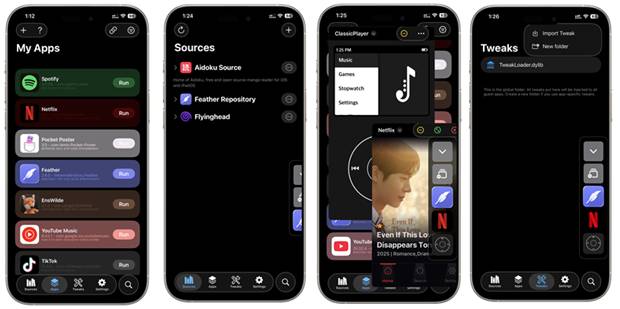
LiveContainer Features Overview
- 📦 Unlimited app launching
- 🧩 Built-in TweakLoader (CydiaSubstrate support)
- 🏠 Add container apps to Home Screen
- 📱 Multitasking on iPhone & iPad
- 👻 App hiding (3 privacy levels)
- 🔁 Multiple app containers (use multiple accounts)
Supported iOS Versions
- ✅ iOS 15 → iOS 18+
- ✅ iOS 26 fully supported
- ❌ No jailbreak required
- ❌ TrollStore not required
Step-by-Step Setup Guide (iOS 26)
Step 1: Install iLoader (PC / Mac / Linux)
iLoader simplifies the entire SideStore + LiveContainer setup.
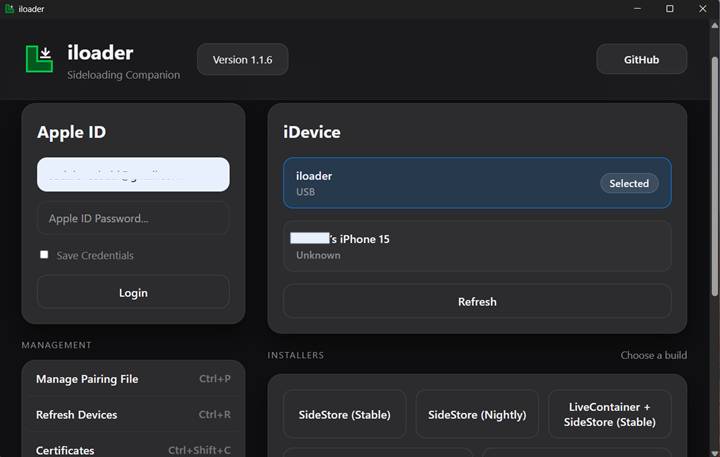
- Download iLoader for Windows, macOS, or Linux
- Launch iLoader on your computer
- Sign in with your Apple ID
- Connect your iPhone via USB
- Select your device from the list
- In Settings, choose SideStore.io as the Anisette Server
Step 2: Install SideStore + LiveContainer
- Select LiveContainer + SideStore (Nightly) in iLoader
- iLoader will:
- Download the apps
- Sign them
- Install pairing files automatically
- On your iPhone:
- Go to Settings → General → VPN & Device Management
- Trust the developer certificate
- Install LocalDevVPN from the App Store
- Open LocalDevVPN and tap Connect
Step 3: Configure SideStore
- Open LiveContainer
- Tap the SideStore icon in the top bar
- Go to My Apps → Refresh
- Enter your Apple ID credentials
- Tap Refresh All
- Return to LiveContainer using the top menu
Step 4: Configure LiveContainer
- Open LiveContainer Settings
- Under JIT-Less Mode, tap:
- Refresh Certificate from SideStore
- Tap JIT-Less Mode Diagnose
- Confirm everything shows as working
Step 5: Install Unlimited IPAs
- Tap + in LiveContainer
- Choose:
- Install IPA File, or
- Install from URL
- The app appears instantly in LiveContainer
- Tap Run to launch — no installation needed
- Long-press apps for advanced options
Final Result
With SideStore + LiveContainer, you get:
- 🚀 Unlimited sideloading on iOS 26
- 🔒 No revokes
- 🧠 No jailbreak
- 📱 Fully on-device experience
This is currently the best and safest way to bypass Apple’s 3-app limit on modern iOS versions.