EnsWilde
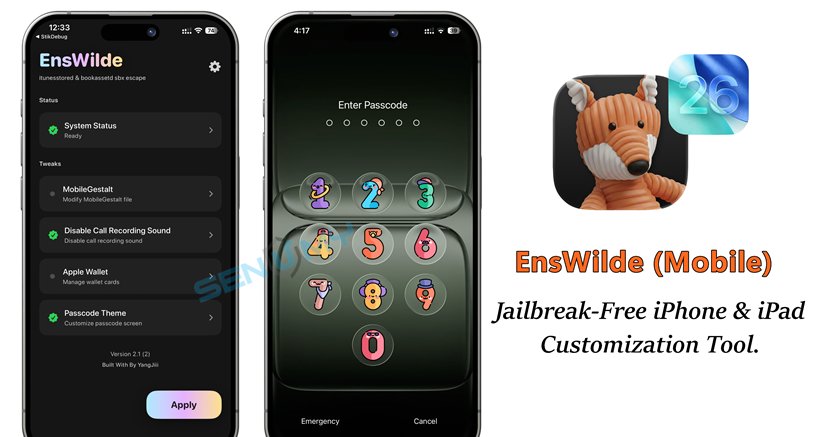
EnsWilde (Mobile) – Jailbreak-Free iPhone & iPad Customization Tool.
EnsWilde (Mobile) is a powerful on-device customization tool for iPhone and iPad, developed by @duongduong0908. Compatible with iOS 18 up to iOS 26.2 Beta 1, EnsWilde leverages system vulnerabilities in itunesstored and bookassetd, along with the SparseRestore exploit, to modify system behavior beyond standard iOS limits — all without requiring a jailbreak.
Unlike older solutions, EnsWilde runs directly on your device as a modern standalone app. After setup, there’s no need for constant computer access, making it convenient and reliable for everyday use.
Why Choose EnsWilde?
EnsWilde provides a range of jailbreak-free iOS customization features that improve usability and personalization on iPhone and iPad:
- Disable Call Recording Notification Sound – Remove the audible warning sound when recording calls, replacing it with silent audio for a smoother, distraction-free experience.
- Change Apple Wallet Background – Customize the background image of Wallet passes and cards for a unique look.
- Passcode Themes – Apply custom images or themes to your passcode unlock screen.
- Advanced MobileGestalt Editing – Modify MobileGestalt configuration values for advanced users.
- On-Device Patching – Works entirely on your iPhone or iPad after setup, no PC required.
What’s New in EnsWilde 3.1.3
The EnsWilde 3.1.3 update focuses on stability, performance, and usability:
- No longer requires StikDebug: You only need to enable LocalDevVPN for it to work.
- App improvements: Enhanced application performance and stability.
- New customization features:
- You can now download DDI directly from Settings, which fixes all previous DDI-related issues.
- Added an option to hide the Dynamic Island in the Theme UI.
(Device restart required to apply.) - Added Feature Flags to control certain in-app functions.
(Device restart required to apply.) - zpatch Custom no longer requires a password.
- Overall, this update improves stability and adds more customization options.
Compatible iOS Versions
- iOS 18 – iOS 26.2 Beta 1
- Works on both iPhone and iPad
- Ideal for users seeking a jailbreak-free solution to enhance and personalize their iOS experience
Download EnsWilde IPA
You can easily install EnsWilde (Mobile) using popular sideloading tools such as AltStore, SideStore, iLoader, or Sideloadly. Simply download the IPA file to your computer and sideload it onto your device.
Perfect for iOS 18 to iOS 26+, including the latest iOS 26.1, this jailbreak alternative is ideal for users who want to mainly disable the call recording notification sound, change the Apple Wallet background image, apply lock screen passcode themes, and more on iPhone and iPad.
v 3.1.3
Want the latest updates, new releases, and support? Join our Telegram channel and stay connected!
👉 Join us on Telegram
How to Install EnsWilde IPA Using PlumeImpactor
Step 1: Download PlumeImpactor Windows / MacOS / Linux
- Connect your device via USB or Wi-Fi
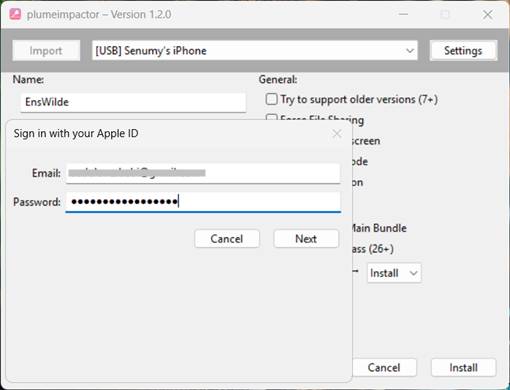
- Add your Apple ID in PlumeImpactor settings
Step 2: Import the IPA
- Click Import
- Select the EnsWilde (Mobile) IPA file
Step 3 (Optional): Edit App Details
- App name
- Bundle identifier
- Version
- Compatibility options

Step 4: Install the App
- Click Install
- Sign in when prompted
- The app will be signed and installed automatically
Step 5: Trust the Certificate
On your iPhone or iPad:
- Go to Settings → General → VPN & Device Management
- Trust the developer profile
✅ Installation complete
How to get the .Mobiledevicepairing file
EnsWilde requires a pairing file to work properly.
Step 1: Download Jitterbug
Download jitterbugpair for your operating system:
https://github.com/osy/Jitterbug/releases/latest
Step 2: Make It Executable (macOS / Linux Only)
Run this command in the file directory:
chmod +x ./jitterbugpair
Step 3: Run the Tool
- Double-click the file
- Or run it via Terminal / PowerShell
Step 4: Transfer the Pairing File
- A
.mobiledevicepairingfile will be created - Send it to your iPhone or iPad using AirDrop, Files, or any transfer method
Step 5: Select the File in EnsWilde
- Open EnsWilde
- Choose the pairing file
You only need to do this once, unless you delete the app or lose the file.
Set Up VPN (Required)
- Download LocaldevVPN or Stikdebug from the iOS App Store
- Enable the VPN inside the app
- Launch EnsWilde
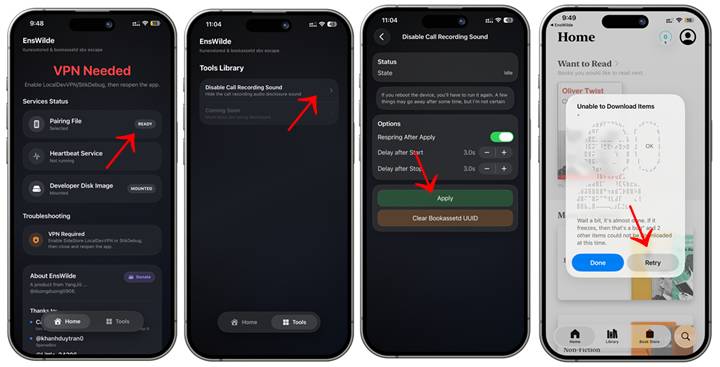
Final Setup – Disable Call Recording Sound
- Open EnsWilde (Mobile)
- Go to the Tools tab
- Tap Disable Call Recording Sound
- When prompted:
- Open the Books app
- Open any book or free sample
This step helps complete the setup process.
✅ Once finished, call recording alert sounds will be replaced with silent audio.