NathanLR iOS 17 Semi-Jailbreak
NathanLR is semi-jailbreak tool for iOS 17.0, created by Nathan, that lets users customize their iPhones using TrollStore — no full jailbreak needed. It’s designed to support tweak injection for visual and UI changes without deep system access.
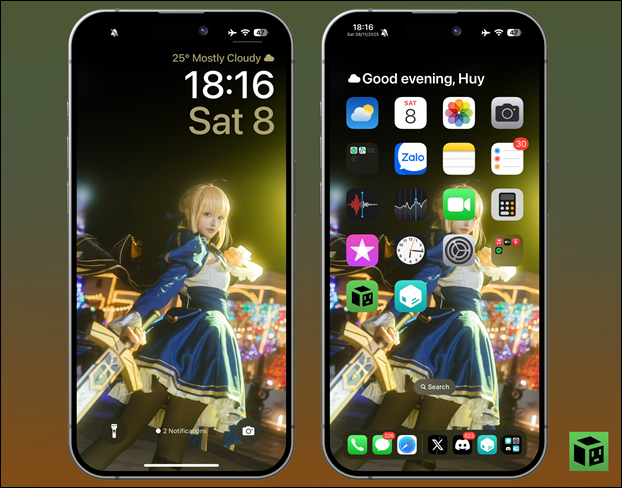
While it’s still under development, early testers like Huy Nguyen have confirmed that popular tweaks are already working, showing big progress for iOS 17 customization.
Download NathanLR IPA for iOS 17
v 2.0.3
How to Install NathanLR on iOS 16.5.1 – 16.6.1, 16.7 RC & iOS 17.0 Devices
Supported Devices:
- A12 and newer iPhones & iPads
Supported Versions:
- iOS/iPadOS 16.5.1 – 16.6.1, 16.7 RC (20H18), and 17.0
Important Notes Before You Start
- If you previously installed Serotonin or Bootstrap, uninstall them completely before using NathanLR.
- If you don’t know what they are, you can ignore this step and continue.
- You must install TrollStore first. NathanLR is installed through TrollStore.
Method 1 — TrollInstallerX (iOS 16.5.1 – 17.0)
Requirements:
- TrollInstallerX (signed on jailbreaks.app)
- Latest PlumeImpactor
- Latest iTunes (Windows only)
- Latest TrollInstallerX .ipa
Install the App
- Connect your iPhone/iPad to your computer.
- Trust your computer when prompted.
- Open PlumeImpactor.
- Go to Settings → Sign In and enter your Apple ID.
- Drag the TrollInstallerX.ipa into PlumeImpactor.
- Tap Install.
- TrollInstallerX will appear on your device.
Trust the App
- Open Settings → General → Device Management.
- Select your Apple ID profile.
- Tap Trust.
If you didn’t install from jailbreaks.app, also enable Developer Mode:
Settings → Privacy & Security → Developer Mode → Turn On
Run TrollInstallerX
- Open TrollInstallerX.
- Tap Install TrollStore.
- If it gets stuck on Exploiting Kernel, reboot and try again.
- When asked to pick a persistence helper app, choose an app you don’t use (e.g., Tips).
- After installation, open that app → press Install TrollStore.
TrollStore is now installed.
Method 2 — TrollRestore (iOS 16.7 RC / 17.0 – macOS, Windows, Linux)
Use the corresponding TrollRestore version for your platform, then follow the on-screen steps.
(Your website/page can link to full instructions here.)
Step 2: Install NathanLR
Download NathanLR
- Download the latest NathanLR.tipa file directly onto your iPhone/iPad.
Install via TrollStore
- Open TrollStore.
- Tap the + button (top-right).
- Select the NathanLR.tipa file.
- Tap Install.
The NathanLR app will now appear on your Home Screen.
Step 3: Run NathanLR (Semi-Jailbreak)
- Reboot your device (recommended).
- Open the NathanLR app immediately after reboot.
- Tap Bootstrap → then tap Jailbreak.
If your device crashes or restarts, simply reboot and run it again.
Once successful, your device will be semi-jailbroken, and Sileo will be installed.
Updating Packages in Sileo
- Open Sileo.
- Go to Packages.
- Tap Upgrade All.
- Tap Confirm.
You can now install themes, tweaks, and customizations supported by semi-jailbreak tools.
NathanLR iOS 17 Semi-Jailbreak — What to Expect
NathanLR is a new semi-jailbreak made specifically for iOS 17.0. It works through TrollStore and offers tweak injection instead of full root access. This means you can customize your iPhone with features like icon layout control, Dock changes, and Control Center tweaks, but without deep system modifications.
Developer Nathan confirmed that the jailbreak’s internal version is already stable, though some features still need fixes. While there’s no release date yet, development is moving quickly and excitement in the community is growing.
Tester Huy Nguyen has already confirmed that several tweaks run smoothly on the current build, showing that NathanLR supports visual and UI customization — similar to RootHide Bootstrap and Serotonin on iOS 16.
In short, NathanLR will bring iOS 17.0 customization back without requiring a full jailbreak — a major win for users who stayed on that version.
Confirmed Working Tweaks
Early tests show several tweaks are already functional:
- Atria – Customize Home Screen icon layouts.
- JellyFish Reborn – Beautiful Lock Screen redesign inspired by watchOS.
- Dock Tweak – Hide or modify the Dock for a cleaner setup.
- Status Bar Mods – Customize date, time, and icon appearance.
Expected to Work
Tweaks likely to work with NathanLR include:
- Axon – Modern notification organizer.
- BatteryBuddy – Custom battery icons and display tweaks.
- BetterCC – Control Center layout customization.
- CozyBadges, Cylinder Remade, Dodo – Home Screen animations and Lock Screen enhancements.
Customization on iOS 17
Once released, NathanLR will bring back advanced customization:
- SnowBoard – Icon theming engine.
- Goji – Over 500 custom icons and badges.
- Spectrum – System color customization.
- Velvet 2 – Notification and media player tweaks.
- VisibleIsland & Zetsu – Dynamic Island and multitasking features.
Conclusion
NathanLR is shaping up to be the most exciting iOS 17 semi-jailbreak yet — offering the best mix of stability, design freedom, and tweak compatibility without needing full root access.
If you’re on iOS 17.0, stay there — updates like 17.0.1 and above patch the exploit. Once released, NathanLR will give iPhone users full creative control again.