vphone-cli & vphone-aio: Easy iOS 26 Virtual iPhone Setup
A new open-source project is making it much easier for security researchers and developers to run a fully virtualized iPhone with iOS 26 on Apple Silicon Macs.

Previously, setting up a virtual iPhone required advanced technical knowledge, firmware extraction, and manual patching. Now, tools like vphone-cli and vphone-aio simplify the entire process.
What Is vphone-cli?
vphone-cli is a command-line tool created by developer Lakr233. It simplifies a complex setup method first documented by researcher Hyungyu Seo (wh1te4ever).
Seo originally showed that Apple’s Private Cloud Compute (PCC) research environment could be modified to boot a near real iPhone running iOS. However, the setup required:
- Extracting firmware manually
- Patching system components
- Deep knowledge of Apple’s boot process
vphone-cli automates most of these steps.
Instead of rebuilding everything from scratch, the tool uses Apple’s own virtualization system inside macOS, including the PCC research VM infrastructure. It prepares and patches an iOS 26 firmware image for virtual boot automatically.
After setup, the result is a fully bootable iOS 26.1 virtual iPhone (model iPhone17,3) that can be accessed via SSH or VNC.
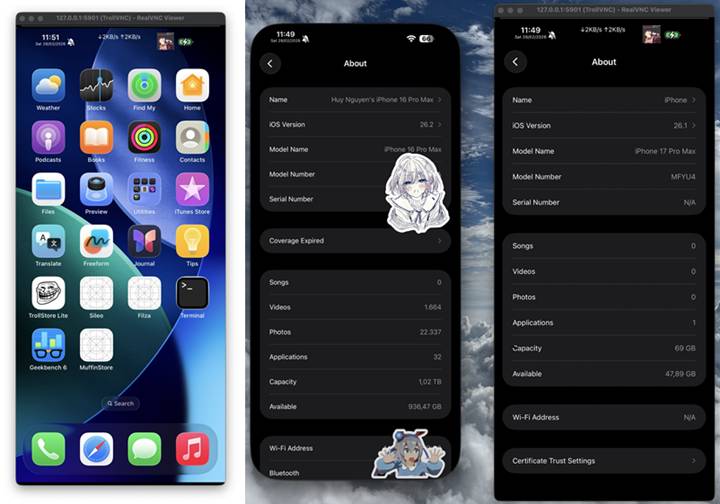
Unlike the simulator included in Xcode, this method boots the full iOS system — including the secure boot chain, kernel, and system services.
What Is vphone-aio?
vphone-aio is an “all-in-one” version of the project released by developer Huy Nguyen.
This version makes the process even simpler:
- Includes a prebuilt virtual machine image
- Comes with a rootless jailbreak-style environment
- Bootstrap already installed
- Start the VM using a single shell script
Users download a roughly 12GB repository, combine the split files, and launch the virtual iPhone.
Once running, the virtual device can be accessed through VNC and interacts like a real iPhone, including the SpringBoard interface.
System Requirements
To run vphone-cli or vphone-aio, you need:
- macOS 15 or later
- Apple Silicon Mac (M1, M2, M3, etc.)
- At least 128GB of free disk space during setup
The setup also requires disabling System Integrity Protection (SIP) and certain Apple Mobile File Integrity checks, as required for research virtual machines.
Why This Matters for iOS Research
The discovery began when researchers noticed “vphone” components inside Apple’s Private Cloud Compute firmware. This suggests Apple internally uses virtual iPhone environments for research.
These new tools show that advanced iOS virtualization no longer depends only on commercial services. Researchers can now run a full iOS 26 virtual device locally using Apple’s own Virtualization.framework.
For the jailbreak community and security researchers, this is significant:
- Allows exploit testing without risking real devices
- Speeds up kernel and boot-chain research
- Creates a repeatable virtual lab environment
The patched boot components used in this setup are similar to techniques used in traditional jailbreak development.
Legal and Policy Considerations
There are still gray areas.
Apple provides the PCC Virtual Research Environment to approved researchers, and disabling SIP for that environment is documented. However, modifying signed firmware images and bypassing signature validation may not align with Apple’s intended use.
As of now, Apple has not publicly commented on vphone-cli or vphone-aio.
Future macOS updates could tighten restrictions or modify how PCC research virtual machines work.
Conclusion
vphone-cli and vphone-aio represent the first widely reproducible method to run a fully virtualized iPhone with iOS 26 on consumer Apple Silicon Macs.
By simplifying firmware preparation and VM setup, these tools make advanced iOS virtualization more accessible to researchers and developers.
For now, this marks a major step forward in local iOS 26 virtual device research.