
Bridge
Bridge – Internal App Opener & Extractor for iOS 16 to iOS 26
Bridge is a powerful tool that lets you access and explore hidden system apps on your iPhone or iPad — apps that are normally invisible to users.
Built using Swift, Shortcuts, and Private APIs, Bridge works perfect on iOS/iPadOS 16.0 to 26.0.
It’s the perfect iOS 26 Jailbreak Alternative for opening, viewing, and extracting internal system apps safely — giving you advanced access and deeper control without needing a jailbreak.
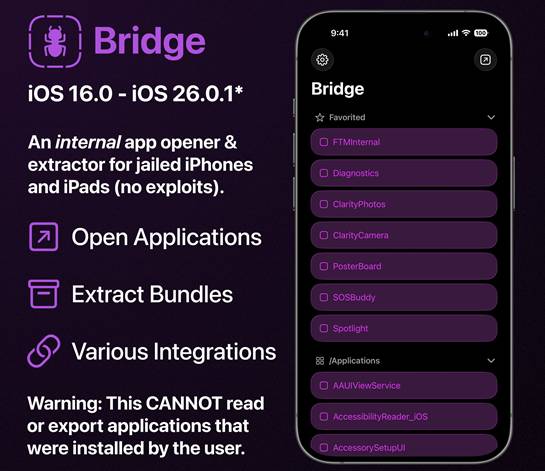
⚠️ Note: Bridge does not display user-installed apps. For that functionality, try using Antrag (though it can’t extract user data).
Readable Partitions
- /Applications: Contains internal apps like view services, UI testing apps, and non-removable stock apps (e.g., Phone, Messages).
- /System/Library/CoreServices: Stores core iOS apps like SpringBoard and other essential system components.
Key Features
- Open Internal Apps:
Access hidden system apps using either Private API or the Shortcuts method. - Export Application Bundle:
Extract an app’s core files (bundle). Note: containers and user data aren’t included. - Favorite Apps:
Save your most-used apps for quick access under “Favorites.”
Download Bridge IPA
You can sideload Bridge IPA using tools like AltStore, SideStore, Sideloadly, and more.
v 1.1
Want the latest updates, new releases, and support? Join our Telegram channel and stay connected!
👉 Join us on Telegram
How to Install & Set Up Bridge
- Install the Bridge Helper Shortcut on your iPhone or iPad.
- Sideload Bridge IPA using AltStore, SideStore, or Sideloadly.
- Open Bridge and tap “Begin Setup.”
- Wait for the app list to generate in the Shortcuts app (about 30 seconds).
- Return to Bridge and tap “Import Applist.”
- Done! You can now explore internal iOS apps.
To install Bridge IPA with AltStore
Step 01. Install AltStore on your iOS device.
Step 02. Download the Bridge IPA file.
Open the AltStore app on your device and go to the “My Apps” tab.
Step 03. Tap on the plus “+” icon at the top, then browse and select the Bridge IPA file you downloaded.
Step 04. If it’s your first time using AltStore, you will be asked to enter your Apple ID and password. AltStore requires it to sign the app so it can be installed. We recommend you use a burner account.
Step 05. The app will begin to install, and once completed, you can open it from your Home screen.
How to Install Bridge IPA with Sideloadly
Step 01. Download the latest version of Sideloadly for Windows or macOS and install it on your PC.
Step 02. Download the Bridge IPA file from this page and save it to your computer.
Step 03. Connect your iOS device to your computer using a USB cable.
Step 04. Open the Sideloadly app on your PC.
You may be prompted to install the Mail Plug-in. Click the “Yes” button to continue.
Enter your Apple ID email under the “Apple account” field.
Step 05. Drag and drop the Bridge IPA file into the IPA field shown on the left side of the interface. An IPA image represents the field.
Step 06. Click the “Start” button to begin the sideloading and installing the IPA.
When prompted, enter your Apple ID password. The tool uses your Apple ID to sideload the app. We recommend you use a burner account.
Step 07. Sideloadly will begin installing Bridge IPA on your iOS device.
Step 08. Once the app is installed, please don’t open it yet. You must verify your Apple ID profile if it’s your first time using Sideloadly. To do it, go to Settings > General > Device Management. Tap on your Apple ID and press the Trust button. Tap on Trust again from the pop-up alert.
Step 09. Now go to the Home screen to open the installed app.
Other methods to install Bridge IPA.
TrollStore
TrollStore is a permasigned jailed app that can permanently install any IPA installer, supporting iOS 14.0, iOS 15, iOS 16, and iOS 17.0. It works by using AMFI/CoreTrust to verify that the root certificate is used to sign the app and not revoke it.
ESign
ESign is a free mobile IPA signature tool for iOS, allowing you to sign apps with your certificates and install them on your iPhone or iPad. It serves as a sideloading alternative with support for iOS 11 up to iOS 17. x, enabling the installation of IPA files without a computer.
Scarlet
Scarlet is installed with this tool, which allows you to add jailbroken repos and install IPA, all without a jailbreak, with support for iOS 11 up to iOS 17 and higher.
Compatibility iOS & iPadOS
- iOS 26 / iOS 26.0.1
- iOS 18.0, iOS 18.0.1, iOS 18.1, iOS 18.2, iOS 18.2.1, iOS 18.3, iOS 18.3.1, iOS 18.3.2, iOS 18.4, iOS 18.4.1, iOS 18.5, iOS 18.6, iOS 18.6.1, iOS 18.6.2
- iOS 17.7, iOS 17.6.1, iOS 17.6, iOS 17.5.1, iOS 17.5, iOS 17.4.1, iOS 17.4, iOS 17.3.1, iOS 17.3, iOS 17.2.1, iOS 17.2, iOS 17.1.1, iOS 17.1, iOS 17.0.2, iOS 17.0.1, iOS 17
- iOS 16.6, iOS 16.5.1, iOS 16.5, iOS 16.4.1, iOS 16.4, iOS 16.3.1, iOS 16.3, iOS 16.1, iOS 16.0.3, iOS 16.0.2, iOS 16.0
Compatibility Devices
iPhone 17 Air, iPhone 17, iPhone 17 Pro, iPhone 17 Pro Max, iPhone 16e, iPhone 16, iPhone 16 Plus, iPhone 16 Pro, iPhone 16 Pro Max, iPhone 15, iPhone 15 Plus, iPhone 15 Pro, iPhone 15 Pro Max, iPhone 14, iPhone 14 Plus, iPhone 14 Pro, iPhone 14 Pro Max, iPhone 13, iPhone 13 Mini, iPhone 13 Pro, iPhone 13 Pro Max, iPhone 12, iPhone 12 Mini, iPhone 12 Pro, and iPhone 12 Pro Max, iPhone 11 Pro Max, iPhone 11 Pro, iPhone 11, iPhone Xs, iPhone Xs Max, iPhone XR.