
Misaka26
Misaka26 – The First iOS 26+ MobileGestalt Tweaking Tool (macOS & Windows)
Misaka26 is the first major tweak tool built using the new MobileGestalt exploit, supporting iOS 16.0 – iOS 26.1 and even iOS 26.2 Beta 1.
This exploit—discovered by researcher Hana Kim—allows modifying hidden system properties normally locked down by Apple. That means you can enable features Apple restricts to certain devices or firmware versions.
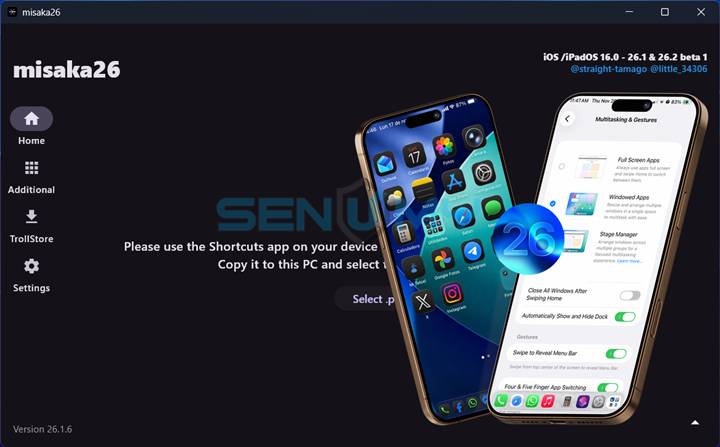
Developer Duy Tran expanded this research and turned it into a fully working tool, while straight-tamago and Huy Nguyen (the creators of Misaka & MisakaX) built a fresh, modern UI that looks like a native macOS app. Misaka26 is available for Windows and macOS with potential Linux support in the future.
Misaka26 is currently one of the best iOS 26.1 jailbreak alternatives. It works like a rare 0-day style tweak tool, allowing you to customize system features even though iOS 26.1 is still the latest signed firmware — all without needing a full jailbreak.
Once installed, Misaka26 lets you unlock premium system features such as:
- Dynamic Island on unsupported devices
- Stage Manager
- Always-On Display
- Apple Intelligence
- iPad-style multitasking (TrollPad)
- Action Button settings
- Shutter sound toggle
- Developer mode tools
- New UI elements
…and more.
You can now even enable the Apple Intelligence interface on any iPhone running iOS 26, no jailbreak required, Some tweaks require a respring, so users should back up their device before applying modifications.
Supported Features (iOS 16.0 – iOS 26.2 Beta 1)
Below is the full list of features you can unlock using Misaka26:
Dynamic Island (multiple resolutions)
- iOS 16+ & iOS 18+ supported
System Enhancements
- Charge Limit (iOS 17+)
- Boot Chime (iOS 17+)
- Stage Manager (iOS 16+)
- Always-On Display (iOS 18+)
- Action Button (iOS 17+)
- Internal Storage UI (iOS 17+)
- Camera Control (iOS 18+)
- Old Photos UI (iOS 18+)
- Wallpaper Parallax Disable
- Tap to Wake (SE2/SE3 – iOS 18+)
New iOS 18 Features
- Apple Intelligence (iOS 18.1+)
- Animation Clock UI
- Sleep Apnea Detection
- SOS Collision
iPad & Developer Features
- TrollPad Multitasking (macOS required)
- Enable iPadOS Apps on iPhone (iOS 16+)
- Developer Mode + Metal HUD
iOS 26+ Features
- Enable PWM
- Enable SRD Mode
- Install M-series games from App Store
Other Tweaks
- Disable Shutter Sound
- Set Product Type / Device Model Name
- Find My Friend (KH/A devices)
Upcoming Features
- Disable call recording greeting
- Custom file path support
Important Notes
Misaka26 writes a customized com.apple.MobileGestalt.plist back to your device using the restore-from-backup method.
This can cause a boot loop if done incorrectly, so always:
✔ Back up your device
✔ Apply tweaks carefully
✔ Respring when required (use the provided Respring IPA)
Download Misaka26 for Windows & macOS
v 1.6
Want the latest updates, new releases, and support? Join our Telegram channel and stay connected!
👉 Join us on Telegram
How to Install Misaka26 on macOS & Windows
Step 1 — Download Misaka26
Grab the latest version of the Misaka26 tool
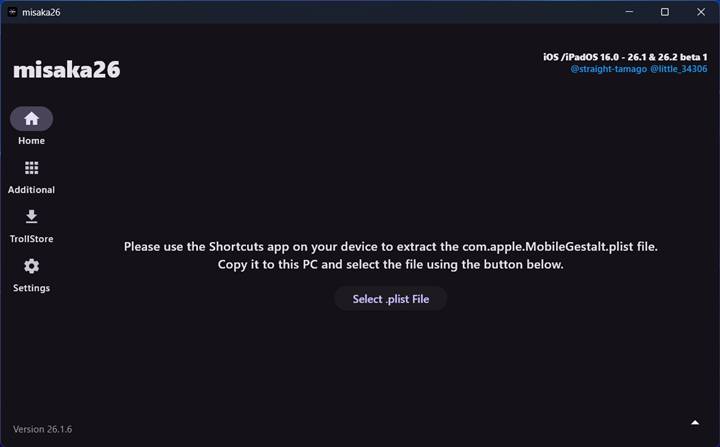
Step 2 — Open Misaka26 on your Mac or Windows PC
Launch the tool after downloading.
Step 3 — Generate Your MobileGestalt File
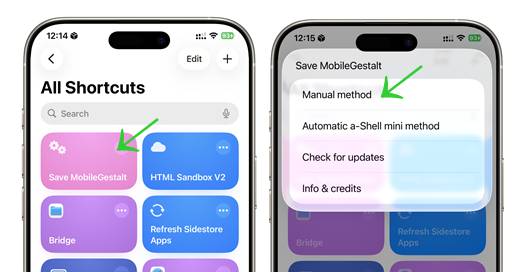
Use the shortcut provided to generate your MobileGestalt file.
After running the shortcut:
- Tap Save to export your MobileGestalt file
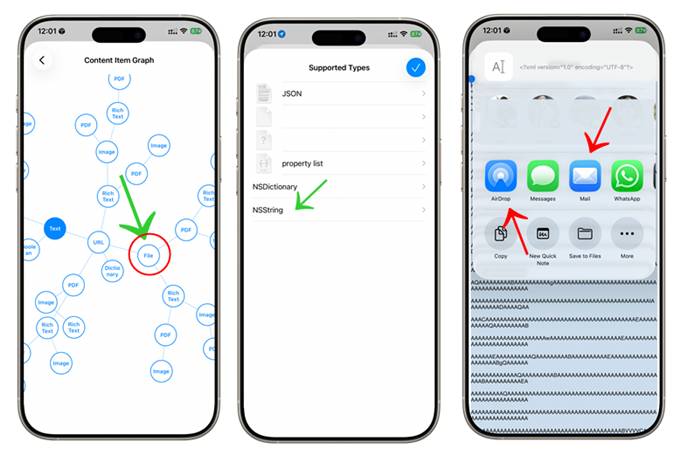
- Choose Manual Method → File → NSString
- Select All, then Share
- AirDrop or send the file to your computer
- Import the MobileGestalt file into the Misaka26 tool
Step 4 — Enable Misaka26 Tweaks
If you want to activate Misaka26 features, disable Find My iPhone first, then click Apply.
Step 5 — Reboot Your Device
Restart your iPhone to activate the tweaks — enjoy!
How to Remove Misaka26 Tweaks and Restore Your Device to Default Settings
If you want to undo your Misaka26 tweaks and return your device to its original state, you can use the built-in Reset feature.
(You may need to temporarily turn off Find My iPhone before resetting.)
Steps to Remove Misaka26 Tweaks
- Open Misaka26 and load your com.apple.MobileGestalt.plist file just like you did when applying the tweaks.
- Tap the arrow icon at the bottom-right corner of the screen.
- Choose “Regenerate MobileGestalt (Reset)” from the menu.
- Your device will automatically reboot, and the reset will be applied.
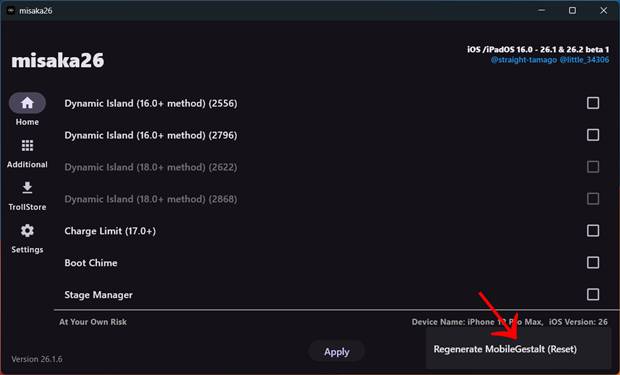
If Tweaks Are Still Active After Reboot
If some changes are still visible after the restart, simply respring your device — the same way you did after applying tweaks.
This will fully restore all settings back to their default state.
Conclusion
Misaka26 is a breakthrough tool for modern iOS customization.
While not a full jailbreak, it brings powerful tweaks to iOS 26.1 and 26.2 beta, letting users unlock features Apple normally hides.
With its clean UI, wide device support, and impressive tweak library, Misaka26 is currently one of the best non-jailbreak customization tools available.