
VansonMod
VansonMod is an advanced memory editing tool for iPhone and iPad, developed by vaenshine and available as an open-source project on GitHub. It allows users to scan, edit, and control live memory values inside running iOS apps.
Unlike basic hex editors, VansonMod is designed specifically for iOS system behavior, including ASLR (Address Space Layout Randomization). This makes it especially useful for reverse engineers, researchers, and advanced users who need precise control over app memory.

VansonMod runs directly on the device and does not require a constant PC connection, making it ideal for on-the-go testing and analysis.
How VansonMod Works
VansonMod works by attaching to active app processes and reading their memory in real time. Instead of relying on fixed memory addresses, it uses Relative Virtual Addresses (RVA).
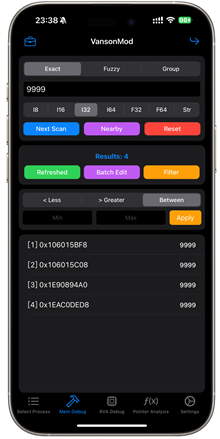
This means you can find and modify the same values even after app restarts or system reboots, where memory locations normally change.
Requirements
- Jailbroken iPhone or iPad
- OR TrollStore-supported environment
- (Required to gain permission to read and write other app memory)
Key Features of VansonMod
• Live memory scanning – Search for numbers, text, or values inside running apps
• Fuzzy search mode – Track values that change over time (timers, counters, scores)
• Real-time memory editing – Modify values instantly and see results immediately
• Freeze values – Lock a memory value so the app cannot change it
• RVA support – Reliable memory offsets across app restarts
• Multiple data types – Supports 4-byte & 8-byte integers, floats, and doubles
• Bookmarks – Save important memory offsets for later use
• Jump to address – Navigate directly to absolute or relative memory locations
• On-device usage – No PC or debugger required
The interface is intentionally technical and data-focused, designed for users who understand memory structures and binary values.
Safety & Open-Source Transparency
VansonMod is fully open source, allowing the community to review its code. This is important because memory editors require deep system access.
To reduce risk, the tool includes basic safety checks to prevent writing to protected or critical system memory areas, helping avoid accidental crashes.
Download VansonMod IPA
You can download the latest VansonMod IPA from the official source.
v 2.3
Want the latest updates, new releases, and support? Join our Telegram channel and stay connected!
👉 Join us on Telegram
Latest Updates & Improvements
Recent VansonMod releases focus on:
• Faster memory scanning (large scans now complete much quicker)
• Improved RVA calculations for apps with multiple frameworks
• Better handling of sub-libraries and shared components
• Reduced memory leaks inside VansonMod itself
• Improved stability during long sessions
The tool is still in active development, with frequent test builds and fixes.
How To Install VansonMod IPA with AltStore
Step 01. Install AltStore on your iOS device.
Step 02. Download the VansonMod IPA file.
Open the AltStore app on your device and go to the “My Apps” tab.
Step 03. Tap on the plus “+” icon at the top, then browse and select the VansonMod IPA file that you downloaded.
Step 04. If it’s your first time using AltStore, you will be asked to enter your Apple ID and password. AltStore requires it to sign the app so it can be installed. We recommend you use a burner account.
Step 05. The app will begin to install, and once completed, you can open it from your Home screen.
How to Install VansonMod IPA with Sideloadly
Step 01. Download the latest version of Sideloadly for Windows or macOS and install it on your PC.
Step 02. Download the VansonMod IPA file from this page and save it to your computer.
Step 03. Connect your iOS device to your computer using a USB cable.
Step 04. Open the Sideloadly app on your PC.
You may be prompted to install the Mail Plug-in. Click the “Yes” button to continue.
Enter your Apple ID email under the “Apple account” field.
Step 05. Drag and drop the VansonMod IPA file into the IPA field shown on the left side of the interface. An IPA image represents the field.
Step 06. Click the “Start” button to begin the sideloading and installing the IPA.
When prompted, enter your Apple ID password. The tool uses your Apple ID to sideload the app. We recommend you use a burner account.
Step 07. Sideloadly will begin installing VansonMod IPA on your iOS device.
Step 08. Once the app is installed, can you not open it yet? You must first verify your Apple ID profile if it’s your first time using Sideloadly. To do it, go to Settings > General > Device Management. Tap on your Apple ID and press the Trust button. Tap on Trust again from the pop-up alert.
Step 09. Now go to the Home screen to open the installed app.
Other methods to install the VansonMod IPA.
TrollStore
TrollStore is a permasigned jailed app that can permanently install any IPA installer, supporting iOS 14.0, iOS 15, iOS 16, and iOS 17.0. It works by using AMFI/CoreTrust to verify that the root certificate is used to sign the app and not revoke it.
eSign
eSign is a free mobile IPA signature tool for iOS, allowing you to sign apps with your certificates and install them on your iPhone or iPad. It serves as a sideloading alternative with support for iOS 11 up to iOS 17. x, enabling the installation of IPA files without a computer.
Scarlet
Scarlet is installed with this tool, which allows you to add jailbroken repos and install IPA, all without a jailbreak, with support for iOS 11 up to iOS 17 and higher.
Compatibility iOS & iPadOS
- iOS 17.0
- iOS 16.6, iOS 16.5.1, iOS 16.5, iOS 16.4.1, iOS 16.4, iOS 16.3.1, iOS 16.3, iOS 16.1, iOS 16.0.3, iOS 16.0.2, iOS 16.0
- iOS 15.6.1, iOS 15.6, iOS 15.5, iOS 15.4.1, iOS 15.4 , iOS 15.3.1, iOS 15.3, iOS 15.2.1. iOS 15.2, iOS 15.1.1, iOS 15.1
- iOS 15.0.2 , iOS 15.0.1, iOS 15.0
- iOS 14.8 , iOS 14.7.1, iOS 14.7, iOS 14.6, iOS 14.5.1, iOS 14.5, iOS 14.4.2, iOS 14.4.1, iOS 14.4, iOS 14.3, iOS 14.2.1
- iOS 14.2, iOS 14.2, iOS 14.1, iOS 14.0
Compatibility Devices
iPhone 14, iPhone 14 Plus, iPhone 14 Pro, iPhone 14 Pro Max, iPhone 13, iPhone 13 Mini, iPhone 13 Pro, iPhone 13 Pro Max, iPhone 12, iPhone 12 Mini, iPhone 12 Pro, and iPhone 12 Pro Max, iPhone 11 Pro Max, iPhone 11 Pro, iPhone 11, iPhone Xs, iPhone Xs Max, iPhone XR, iPhone X, iPhone 8, iPhone 8 Plus, Phone 7 & 7 Plus, iPhone 6S & 6S Plus, iPhone 6 & 6 Plus, iPhone SE