
iPSX2 – PS2 Emulator
iPSX2 – PS2 Emulator for iPhone & iPad 🎮
iPSX2 is a PlayStation 2 emulator for iOS, built using ports of PCSX2 and ARMSX2. It lets you try PS2 games directly on your iPhone or iPad.
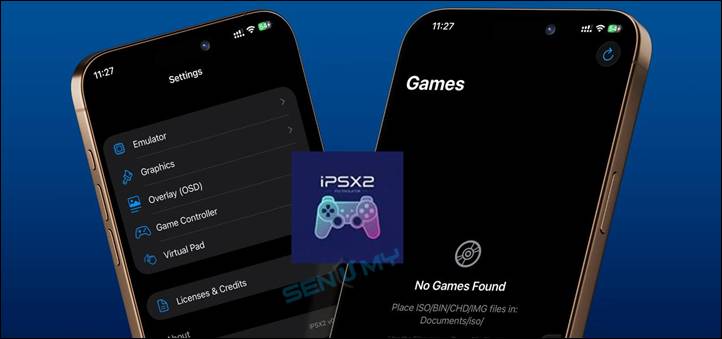
⚠️ This is an early version, so some features are still in development.
Features
• Based on PCSX2 & ARMSX2
• Requires JIT for better performance
• Supports iPhone & iPad
• AI-assisted development
Compatibility
Works on:
• iOS 18 → iOS 26+
• Tools like StikDebug & UTM-Dolphin.js
Download iPSX2 IPA – PS2 Emulator
Get the latest iPSX2 IPA and install guide from your trusted source.
Latest Update (v0.1.1)
• Added iPad support
• Customizable on-screen controls (virtual pad)
• Improved system testing (PCSX2-level checks for EE/DMA/SMC)
• More stability improvements
v 0.1.1
Want the latest updates, new releases, and support? Join our Telegram channel and stay connected!
👉 Join us on Telegram
How to Install iPSX2 (PS2 Emulator) on iPhone & iPad
This guide shows you how to install the iPSX2 emulator on your iPhone or iPad step by step.
Step 1: Install the iPSX2 IPA
The easiest way to install iPSX2 is by using SideStore (a tool for sideloading apps).
Steps:
01. Install SideStore on your iPhone or iPad
02. Download the latest iPSX2 IPA file
03. Open SideStore and import the IPA file
04. Tap install and wait for it to finish
After installing, go to:
Settings → General → VPN & Device Management
Trust the developer certificate
✅ Now the app will open on your device
Step 2: Enable JIT (Important)
JIT is required to actually run PS2 games.
Without it, the emulator will open, but games won’t work.
How to enable JIT:
- Install StikDebug
- (Optional) Install LocalDevVPN if your iOS version needs it
- Open StikDebug and set it up for iPSX2
- Follow a SideStore JIT setup guide to finish
Simple Explanation
JIT helps the emulator run games smoothly.
❌ No JIT = games won’t start
✅ With JIT = games can run
How To Install iPSX2 (PS2 Emulator) IPA with AltStore
Step 01. Install AltStore on your iOS device.
Step 02. Download the iPSX2 (PS2 Emulator) IPA file.
Open the AltStore app on your device and go to the “My Apps” tab.
Step 03. Tap on the plus “+” icon at the top, then browse and select the iPSX2 (PS2 Emulator) IPA file you downloaded.
Step 04. If it’s your first time using AltStore, you will be asked to enter your Apple ID and password. AltStore requires it to sign the app so it can be installed. We recommend you use a burner account.
Step 05. The app will begin to install, and once completed, you can open it from your Home screen.
Other methods to install iPSX2 (PS2 Emulator) IPA with.
TrollStore
TrollStore is a permasigned jailed app that can permanently install any IPA installer, supporting iOS 14.0, iOS 15, iOS 16, and iOS 17.0. It works by using AMFI/CoreTrust to verify that the root certificate is used to sign the app and not revoke it.
e-Sign
e-Sign is a free mobile IPA signature tool for iOS, allowing you to sign apps with your certificates and install them on your iPhone or iPad. It serves as a sideloading alternative with support for iOS 11 up to iOS 17. x, enabling the installation of IPA files without a computer.
MapleSign
Discover the most affordable signing service for your iOS devices. Elevate your experience with our ultimate free enterprise certificates IPA sideload signing service, compatible with iPhone, iPad, Apple tvOS, and visionOS.
3uTools
Using the 3uTools IPA Signature is widely regarded as the best method for installing IPA files. Whether you’re on a Mac or Windows, installing IPAs on your iPhone or iPad is straightforward and easy.
Scarlet
Scarlet is installed with this tool, which allows you to add jailbroken repos and install IPA, all without a jailbreak, with support for iOS 11 up to iOS 17 and higher.
Compatibility iOS & iPadOS
- iOS 26.0, iOS 26.0.1, iOS 26.1
- iOS 18.0, iOS 18.0.1, iOS 18.1, iOS 18.2, iOS 18.2.1, iOS 18.3, iOS 18.31, iOS 18.4, iOS 18.4.1, iOS 18.5, iOS 18.6, iOS 18.6.1, iOS 18.6.2
- iOS 17.5.1, iOS 17.5, iOS 17.4.1, iOS 17.4, iOS 17.3.1, iOS 17.3, iOS 17.2.1, iOS 17.2, iOS 17.1.1, iOS 17.1, iOS 17.0.2, iOS 17.0.1, iOS 17.0
- iOS 16.6, iOS 16.5.1, iOS 16.5, iOS 16.4.1, iOS 16.4, iOS 16.3.1, iOS 16.3, iOS 16.1, iOS 16.0.3, iOS 16.0.2, iOS 16.0
Compatibility Devices
iPhone 17 Air, iPhone 17, iPhone 17 Pro, iPhone 17 Pro Max, iPhone 16e, iPhone 16, iPhone 16 Plus, iPhone 16 Pro, iPhone 16 Pro Max, iPhone 15, iPhone 15 Plus, iPhone 15 Pro, iPhone 15 Pro Max, iPhone 14, iPhone 14 Plus, iPhone 14 Pro, iPhone 14 Pro Max, iPhone 13, iPhone 13 Mini, iPhone 13 Pro, iPhone 13 Pro Max, iPhone 12, iPhone 12 Mini, iPhone 12 Pro, and iPhone 12 Pro Max, iPhone 11 Pro Max, iPhone 11 Pro, iPhone 11, iPhone Xs, iPhone Xs Max, iPhone XR