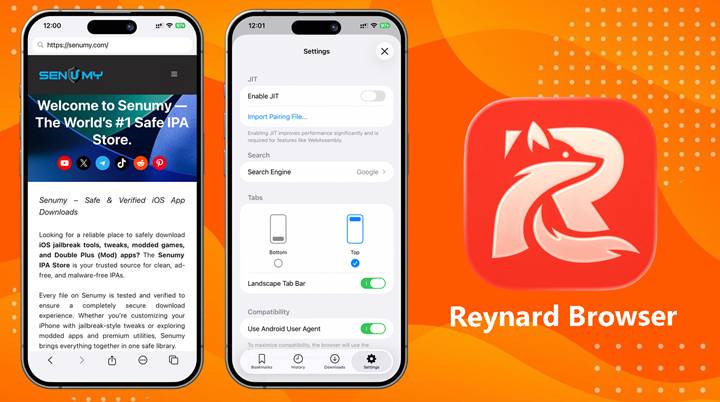
Reynard Browser
Reynard Browser is an experimental open-source web browser for iPhone and iPad that uses Mozilla’s Gecko engine instead of Apple’s WebKit.
Unlike Safari, Chrome, or Firefox on iOS—which all rely on Apple’s WebKit engine—Reynard delivers a true alternative browsing experience powered by the same engine used in desktop Firefox.
Supports iOS 14 up to the latest iOS 26+ versions.
What Makes Reynard Browser Different?
Most browsers on iOS are forced to use Apple WebKit, even if they look different on the surface. Reynard changes that by bringing the Gecko engine directly to iOS devices.
This allows users to:
• Load modern websites more reliably
• Use newer web technologies
• Enjoy Firefox-style browser extensions
• Improve browsing on older unsupported iPhones
Designed for Older iPhones & iPads
Reynard is especially useful for users running older iOS versions such as iOS 14 or iOS 15.
Because WebKit is tied to the iOS version, older devices often struggle with modern websites. Reynard solves this problem by bundling its own updated browser engine directly into the app.
This means websites like GitHub, ChatGPT, and Apple.com can work much better on older devices.
Key Features
✅ Gecko engine (Firefox-based)
✅ Supports iOS 14 and newer
✅ Better compatibility with modern websites
✅ Firefox-style extension support
✅ WebGPU support in newer releases
✅ Open-source project
✅ Works on iPhone and iPad
Extension Support
Reynard supports several popular Firefox-style extensions, including:
• uBlock Origin
• Tampermonkey
• Dark Reader
This is something rarely available on iOS browsers.
Current Limitations
Reynard is still in alpha development, so some features may not work perfectly.
Known issues include:
• Fullscreen video support missing
• Some websites may crash during forms
• Occasional freezes on low-memory devices
• Some videos may play without audio
Download Reynard Browser IPA
Reynard is not available on the App Store. You must install it using sideloading tools such as:
• iLoader
• Impactor
0.2.0 alpha
Want the latest updates, new releases, and support? Join our Telegram channel and stay connected!
👉 Join us on Telegram
How To Install Reynard Browser IPA with AltStore
Step 01. install AltStore on your iOS device.
Step 02. Download the Reynard Browser IPA file.
Open the AltStore app on your device and go to the “My Apps” tab.
Step 03. Tap on the plus “+” icon at the top, then browse and select the Reynard Browser IPA file that you downloaded.
Step 04. If it’s your first time using AltStore, you will be asked to enter your Apple ID and password. AltStore requires it to sign the app so it can be installed. We recommend you use a burner account.
Step 05. The app will begin to install and once completed, you can open it from your Home screen.
How to Install Reynard Browser IPA with Sideloadly
Step 01. Download the latest version of Sideloadly for Windows or macOS and install it on your PC.
Step 02. Download the Reynard Browser IPA file from this page and save it to your computer.
Step 03. Connect your iOS device to your computer using a USB cable.
Step 04. Open the Sideloadly app on your PC.
You may be prompted to install the Mail Plug-in. Click the “Yes” button to continue.
Enter your Apple ID email under the “Apple account” field.
Step 05. Drag and drop the Reynard Browser IPA file into the IPA field shown on the left side of the interface. The field is represented by an IPA image.
Step 06. Click the “Start” button to begin the sideloading and installing the IPA.
When prompted, enter your Apple ID password. The tool uses your Apple ID to sideload the app. We recommend you use a burner account.
Step 07. Sideloadly will begin installing YTMusic Ultimate IPA on your iOS device.
Step 08. Once the app is installed, could you not open it yet? You must verify your Apple ID profile if it’s your first time using Sideloadly. To do it, go to Settings > General > Device Management. Tap on your Apple ID and press the Trust button. Tap on Trust again from the popup alert.
Step 09. Now go to the Home screen to open the installed app.
Other methods to install Reynard Browser IPA with.
TrollStore
TrollStore is a permasigned jailed app that can permanently install any IPA installer, supporting iOS 14.0, iOS 15, iOS 16, and iOS 17.0. It works by using AMFI/CoreTrust to verify that the root certificate is used to sign the app and not revoke it.
e-Sign
e-Sign is a free mobile IPA signature tool for iOS, allowing you to sign apps with your certificates and install them on your iPhone or iPad. It serves as a sideloading alternative with support for iOS 11 up to iOS 17. x, enabling the installation of IPA files without a computer.
MapleSign
Discover the most affordable signing service for your iOS devices. Elevate your experience with our ultimate free enterprise certificates IPA sideload signing service, compatible with iPhone, iPad, Apple tvOS, and visionOS.
3uTools
Using the 3uTools IPA Signature is widely regarded as the best method for installing IPA files. Whether you’re on a Mac or Windows, installing IPAs on your iPhone or iPad is straightforward.
Scarlet
Scarlet is installed with this tool, which allows you to add jailbroken repos and install IPA, all without a jailbreak, with support for iOS 11 up to iOS 17 and higher.
Compatibility iOS & iPadOS
- iOS 26.0, iOS 26.0.1, iOS 26.1, iOS 26.2, iOS 26.2.1, iOS 26.3, iOS 26.4
- iOS 18.0, iOS 18.0.1, iOS 18.1, iOS 18.2, iOS 18.2.1, iOS 18.3, iOS 18.31, iOS 18.4, iOS 18.4.1, iOS 18.5, iOS 18.6, iOS 18.6.1, iOS 18.6.2
- iOS 17.7, iOS 17.6.1, iOS 17.6, iOS 17.5.1, iOS 17.5, iOS 17.4.1, iOS 17.4, iOS 17.3.1, iOS 17.3, iOS 17.2.1, iOS 17.2, iOS 17.1.1, iOS 17.1, iOS 17.0.2, iOS 17.0.1, iOS 17.0
- iOS 16.6, iOS 16.5.1, iOS 16.5, iOS 16.4.1, iOS 16.4, iOS 16.3.1, iOS 16.3, iOS 16.1, iOS 16.0.3, iOS 16.0.2, iOS 16.0
- iOS 15.6.1, iOS 15.6, iOS 15.5, iOS 15.4.1, iOS 15.4 , iOS 15.3.1, iOS 15.3, iOS 15.2.1. iOS 15.2, iOS 15.1.1, iOS 15.1
- iOS 15.0.2 , iOS 15.0.1, iOS 15.0
- iOS 14.8 , iOS 14.7.1, iOS 14.7, iOS 14.6, iOS 14.5.1, iOS 14.5, iOS 14.4.2, iOS 14.4.1, iOS 14.4, iOS 14.3, iOS 14.2.1
- iOS 14.2, iOS 14.2, iOS 14.1, iOS 14.0
- iOS 13/ iOS 13.1/ iOS 13.1.1/ iOS 13.1.2/ iOS 13.1.3/ iOS 13.2/ iOS 13.2.1/ iOS 13.2.2 / iOS 13.2.3/ iOS 13.3/ iOS 13.3.1/ iOS 13.4/ iOS 13.4/ iOS 13.4.1/ iOS 13.4.1/ iOS 13.5/ 13.5.1/ iOS 13.6
Compatibility Devices
iPhone 17 Air, iPhone 17, iPhone 17 Plus, iPhone 17 Pro, iPhone 17 Pro Max, iPhone 16e, iPhone 16, iPhone 16 Plus, iPhone 16 Pro, iPhone 16 Pro Max, iPhone 15, iPhone 15 Plus, iPhone 15 Pro, iPhone 15 Pro Max, iPhone 14, iPhone 14 Plus, iPhone 14 Pro, iPhone 14 Pro Max, iPhone 13, iPhone 13 Mini, iPhone 13 Pro, iPhone 13 Pro Max, iPhone 12, iPhone 12 Mini, iPhone 12 Pro, and iPhone 12 Pro Max, iPhone 11 Pro Max, iPhone 11 Pro, iPhone 11, iPhone Xs, iPhone Xs Max, iPhone XR, iPhone X, iPhone 8, iPhone 8 Plus, Phone 7 & 7 Plus, iPhone 6S & 6S Plus, iPhone 6 & 6 Plus, iPhone SE.iPhone 11 Pro, iPhone 11, iPhone SE.